
Slate for Kids1.10 - Google Play
You'll be able to see results in few seconds.
Publisher Description


Your Smartphone, Tablet can now be easily converted to an on-the-move Slate. Yes, a "Slate for kids". All children start writing by scribbling, an activity most toddlers enjoy. As soon as your child is old enough to scribble (as early as a 2 year old) you must offer them this app "Slate for Kids" and let him or her enjoy, experiment and learn. Slate for kids helps to encourage kids to translate their imagination on to the slate.
Now, you can see yours kid’s imagination and be part of their fun world through Slate for Kids.
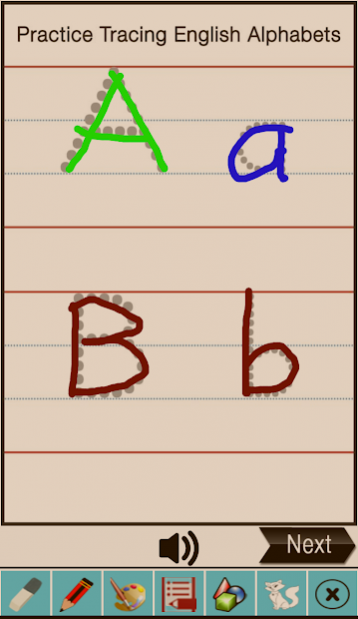
Nursery and Preschool kids will love slate as it helps them to practice English Alphabets or A-Z using 4 line tracing, Hindi alphabets using 3 line tracing. Tracing 1-50 numbers, learn and draw different shapes and color cartoons and many more exciting things to do on this Slate for kids.
Slate for Kids is second in line after initial success of Kid's fun and Learn, Preschool and Kindergarten. There was demand for more features and platform for kids to practice Alphabets. Understanding horizontal, vertical and slant lines. start scribbling using different colors with multiple sizes of pencils and brushes.
Alphabets/ABC or A-Z with tracing on dotted lines will help improve kid's handwriting. 4 line Tracing with audio for Alphabets/ABC provides better understanding and help learning ABC. Tracing Alphabets on 4 lines with audio not only gives understanding of capital and small alphabet letters but also improves the lining and curves in right manner.
Slate for kids has got numbers tracing from 1-50 or one to fifty in dotted lines tracing with Audio for better understanding. Number practice and counting the numbers can help nursery and preschool kids in future
Slate for Kids has a introduced three lines tracing for Hindi alphabets. Hindi alphabets also has got Vowels and Consonants. Practicing Hindi alphabets on dotted lines help kids or primary kids understand words and curves used in Hindi alphabets. Regular practice on three lines tracing help them understand and learn the alphabets and improve their handwriting.
Coloring the cartoons gives knowledge of colors to preschool kids. Helps to improve concentration as well.
Toddlers, nursery kids, preschool kids can scribble, draw lines, curves, cartoon drawing and coloring help them understand use of pencil, colors and eraser with ease.
There are many pictures of known cartoons in Slate for Kids which can help the kids to understand and learn to color using different color and imaginations.
Tic-Tac-Toe is not only fun for kids but even elders who can enjoy playing with kids on Slate for kids.
Now, kids or parents can share theirs creativity with friends and relatives using share option. Share option is new features introduced to encourage the kids to share their work others.
Now, kids don't need chalk, duster, whiteboard pen or erasing marks. Kids can use Slate for Kids anytime, anywhere and on any Android device.
Advantage of this app is it doesn't requires internet connection and once downloaded it can be used anytime anywhere with ease.
About Slate for Kids
The company that develops Slate for Kids is Vinay Shelar. The latest version released by its developer is 1.10.
To install Slate for Kids on your Android device, just click the green Continue To App button above to start the installation process. The app is listed on our website since 2021-10-02 and was downloaded 0 times. We have already checked if the download link is safe, however for your own protection we recommend that you scan the downloaded app with your antivirus. Your antivirus may detect the Slate for Kids as malware as malware if the download link to com.handyedu.slateapp is broken.
How to install Slate for Kids on your Android device:
- Click on the Continue To App button on our website. This will redirect you to Google Play.
- Once the Slate for Kids is shown in the Google Play listing of your Android device, you can start its download and installation. Tap on the Install button located below the search bar and to the right of the app icon.
- A pop-up window with the permissions required by Slate for Kids will be shown. Click on Accept to continue the process.
- Slate for Kids will be downloaded onto your device, displaying a progress. Once the download completes, the installation will start and you'll get a notification after the installation is finished.
Program Details
System requirements
Download information
Pricing
Version History
version 1.10
posted on 2021-10-02
Disclaimer
Official Google Play Link
We do not host Slate for Kids on our servers. We did not scan it for viruses, adware, spyware or other type of malware. This app is hosted by Google and passed their terms and conditions to be listed there. We recommend caution when installing it.
The Google Play link for Slate for Kids is provided to you by apps112.com without any warranties, representations or guarantees of any kind, so access it at your own risk.
If you have questions regarding this particular app contact the publisher directly. For questions about the functionalities of apps112.com contact us.
